Blog /
Software Deployment Testing: What to Check After a Deploy
Software deployment testing: verify critical user journeys on the live app after each release, with regression coverage and agent-driven checks.
After a deploy, check the app users actually reach, in a real browser: that the release landed in the right environment, that sign-in and the one action your app exists for still work for a real user, and that nothing that worked yesterday stopped working. That is software deployment testing. A green build shows that the code is consistent with itself. It shows nothing about the sign-in page.
The scene is familiar. Claude Code finishes a refactor of the session middleware, reports that the tests pass, and the pipeline goes green. Twenty minutes later someone writes in to say the app bounces back to the login page every time they open Settings. The unit tests passed because they never left the test process. The end-to-end suite passed because it ran against fixtures with a stubbed auth provider. Nothing in the pipeline ever touched the deployed app with a real cookie, a real redirect and a real browser.
What Deployment Testing Proves and What CI Misses
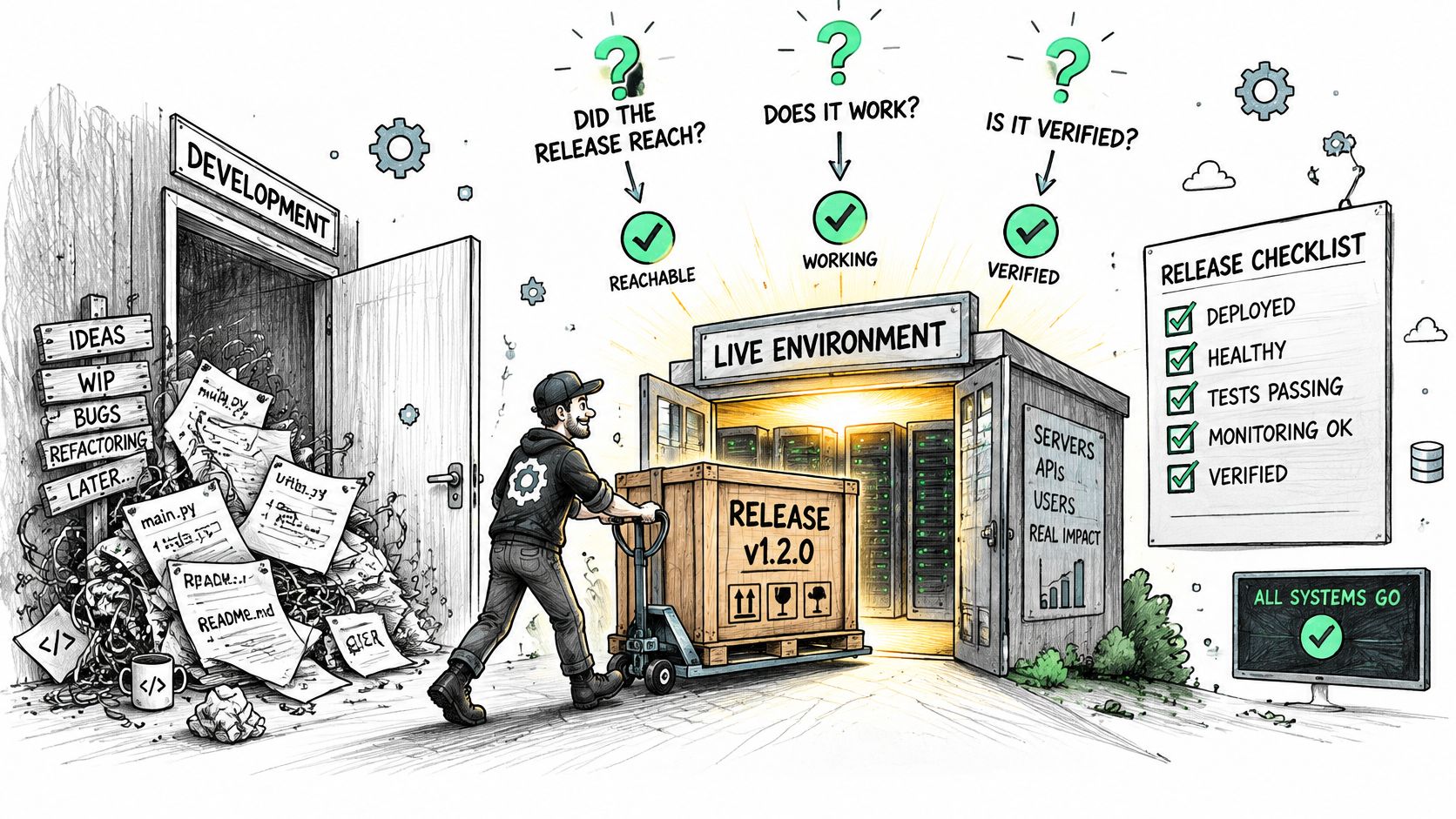
A pipeline full of green tests can still ship a broken sign-in page, because every stage before production runs against an approximation of the app users reach. The gap between what a build can prove and what only the deployed app can show is where failed releases live.
Unit and integration suites exercise a build with fixtures. The deployed app adds production configuration, the live auth provider, DNS and TLS, CDN caching, migrated data and third-party embeds. A green suite shows the code is self-consistent. It says nothing about whether the app works where users are.
The comparison that holds up is a kitchen. The build is the recipe. The deployment check is tasting the dish in the kitchen that serves it, not in the test kitchen where the oven was calibrated last month.
The six layers and what each one cannot see
Each layer is real evidence, and each one has a blind spot. Keep the table open the next time someone argues the suite already covers it.
| Layer | What it catches | Where it runs | What it misses |
|---|---|---|---|
| Static and type checks | Type errors, unused code, obvious contract breaks | Local and CI, on source | Everything runtime and environmental |
| Unit tests | Logic errors inside one function or module | Local and CI, on source | Wiring, configuration, real data |
| Integration and API tests | Contract breaks between services and the database | CI, against a test environment | Production configuration, real providers, browser behaviour |
| End-to-end suite | Multi-step flows through the interface | CI, against a staging build with fixtures | Production data, auth provider setup, CDN and third-party content |
| Live journey check | Whether the deployed app works as a user, including behind sign-in | The deployed environment, in a real browser | Root cause, behaviour under load, unit-level defects |
| Manual click-through | Whatever a person happens to notice | Anywhere, by hand | Repeatability and coverage after every deploy |
- Layer
- Static and type checks
- What it catches
- Type errors, unused code, obvious contract breaks
- Where it runs
- Local and CI, on source
- What it misses
- Everything runtime and environmental
- Layer
- Unit tests
- What it catches
- Logic errors inside one function or module
- Where it runs
- Local and CI, on source
- What it misses
- Wiring, configuration, real data
- Layer
- Integration and API tests
- What it catches
- Contract breaks between services and the database
- Where it runs
- CI, against a test environment
- What it misses
- Production configuration, real providers, browser behaviour
- Layer
- End-to-end suite
- What it catches
- Multi-step flows through the interface
- Where it runs
- CI, against a staging build with fixtures
- What it misses
- Production data, auth provider setup, CDN and third-party content
- Layer
- Live journey check
- What it catches
- Whether the deployed app works as a user, including behind sign-in
- Where it runs
- The deployed environment, in a real browser
- What it misses
- Root cause, behaviour under load, unit-level defects
- Layer
- Manual click-through
- What it catches
- Whatever a person happens to notice
- Where it runs
- Anywhere, by hand
- What it misses
- Repeatability and coverage after every deploy
Practical rule: A suite that never leaves the test environment can't tell you what production configuration does to your app.
The metric that makes a broken journey a delivery failure
The DevOps Research and Assessment program makes this measurable. DORA's metrics guide defines deployment frequency as the number of deployments over a given period, and change fail rate as the ratio of deployments that require immediate intervention following a deployment, typically a rollback or a hotfix. The guide puts the first under throughput and the second under instability, and notes that top performers do well across all of the metrics.
A sign-in page that breaks in production and needs a hotfix is a failed change, whether or not anyone opened a ticket. If nothing checks the deployed app, the failure still happens; it just isn't counted until a user reports it.
Why the agent's own report can't settle it
When Claude Code, Cursor or Codex says the change is done, that is a summary of work the agent did, written from inside the environment where the work happened. Nothing in it comes from the deployed app.
More tests in the same environment don't close that gap, because they inherit the assumptions of the implementation. Coverage is also thin in many teams: mabl's 2024 Testing in DevOps report says 67% of both web and mobile app development teams report having less than 60% test coverage, and one in five teams have less than 20%.
That is the specific problem a live journey check exists to solve, and it is why a check against the deployed app finds things the suite structurally cannot. Your agent says done. CheckMyApp uses your live app as a real user and tells it what broke.
Journeys That Need a Check on Every Deploy
Pick journeys by consequence, not by page count. A journey is critical if it moves money, grants access, writes data the user would miss, or is the first thing a new user does. For most small apps that is a short list. Everything else can run on a schedule.
The second filter is failure mode. A page that renders static copy badly is annoying. A password reset that silently stops sending mail locks people out for days before anyone complains. Rank by how long the break would survive unnoticed.
| Journey | What the check asserts | How it breaks after a deploy | Run |
|---|---|---|---|
| Email sign-up | A new test address creates an account and lands signed in | Verification mail, duplicate check or form validation changed | Every deploy |
| Password sign-in | A test account signs in and the page leaves the login URL | Session cookie, redirect or auth configuration changed | Every deploy |
| Password reset | Reset link opens, a new password saves, the new password signs in | Token expiry, mail template or route changed | Daily |
| Social sign-in | The provider round trip returns to the app signed in | OAuth client, callback URL or scope changed | Daily |
| Core action | A record is created, saved and read back intact | Schema migration, API contract or permission changed | Every deploy |
| Checkout or plan page | Prices load from the payment provider and the form renders | Provider key, webhook or environment switch changed | Every deploy |
| Settings and permissions | A saved setting persists and a non-owner is refused | Role logic, cache or feature flag changed | Daily |
| Embedded media and assets | Video, images and fonts load from their hosts | CDN, hotlink policy or provider removal | Daily |
| Sign-out | The session ends and protected pages redirect | Cookie clearing or middleware changed | Daily |
| Public landing page | The page renders and the primary call to action links correctly | Build output, routing or asset hashing changed | Every deploy |
- Journey
- Email sign-up
- What the check asserts
- A new test address creates an account and lands signed in
- How it breaks after a deploy
- Verification mail, duplicate check or form validation changed
- Run
- Every deploy
- Journey
- Password sign-in
- What the check asserts
- A test account signs in and the page leaves the login URL
- How it breaks after a deploy
- Session cookie, redirect or auth configuration changed
- Run
- Every deploy
- Journey
- Password reset
- What the check asserts
- Reset link opens, a new password saves, the new password signs in
- How it breaks after a deploy
- Token expiry, mail template or route changed
- Run
- Daily
- Journey
- Social sign-in
- What the check asserts
- The provider round trip returns to the app signed in
- How it breaks after a deploy
- OAuth client, callback URL or scope changed
- Run
- Daily
- Journey
- Core action
- What the check asserts
- A record is created, saved and read back intact
- How it breaks after a deploy
- Schema migration, API contract or permission changed
- Run
- Every deploy
- Journey
- Checkout or plan page
- What the check asserts
- Prices load from the payment provider and the form renders
- How it breaks after a deploy
- Provider key, webhook or environment switch changed
- Run
- Every deploy
- Journey
- Settings and permissions
- What the check asserts
- A saved setting persists and a non-owner is refused
- How it breaks after a deploy
- Role logic, cache or feature flag changed
- Run
- Daily
- Journey
- Embedded media and assets
- What the check asserts
- Video, images and fonts load from their hosts
- How it breaks after a deploy
- CDN, hotlink policy or provider removal
- Run
- Daily
- Journey
- Sign-out
- What the check asserts
- The session ends and protected pages redirect
- How it breaks after a deploy
- Cookie clearing or middleware changed
- Run
- Daily
- Journey
- Public landing page
- What the check asserts
- The page renders and the primary call to action links correctly
- How it breaks after a deploy
- Build output, routing or asset hashing changed
- Run
- Every deploy
Account rules that decide whether a journey can run
A check can only walk a journey it has credentials for. To cover pages behind sign-in, it has to act as a test user of your own, so that account needs the same permissions a real user has and not less. A read-only account will pass a settings check that a real member would fail.
Use one test account per role: admin and regular user, free and paid plan. That separates a free-tier user from an admin, which matters because many authorization bugs only appear for one role.
Decide the record-creation question before the first run. A sign-up check that completes creates a real account in your database, and a core-action check that saves creates a real record. Whatever runs the check, letting it create real records should be a switch only a person can turn on. An agent shouldn't be able to widen its own blast radius.
Practical rule: If a journey would email a stranger or charge a card, leave it in the daily set with a real test address rather than in the every-deploy set.
Who supplies the list
Two sources, and they disagree in useful ways. An agent reading your code can enumerate routes, forms and auth walls, which gives broad coverage fast. The live app shows which journeys people can actually start, including the ones nobody wrote down.
Take both. Have the agent propose the list from the code, add the journeys found on the live site, then decide which entries are critical. Journeys discovered on the live app reflect what shipped rather than what was intended.
The Deployment Verification Sequence Step by Step
Timing decides what a check can prove. In GitHub Actions, when a workflow job that references an environment runs, it creates a deployment object, and as the workflow progresses it creates deployment status objects. A checker can use those to tie a verification to the environment it belongs to.
The distinction that matters is between requesting a deployment and finishing one. The deployment_status event runs a workflow when a third party provides a deployment status, and a status set to inactive does not trigger a run. Hanging the check on that event, gated on success, means it follows code that reached production rather than code that reached a branch.
The seven steps
Record the release. Commit SHA, environment name, deployed URL. Without all three, a passing check can't be attributed to a revision, and a failing one invites an argument about which build the browser saw.
Probe the edge. The entry page returns 200 over HTTPS, redirects land where intended, and no certificate or DNS error appears. This catches the deploy that succeeded while the load balancer served the old certificate.
Sign in with a named test account. Confirm the URL leaves the login route. The failure this catches is the quiet one: a 200 response, a session cookie set, and the user still staring at the login form.
Walk the action the app exists for. Create a record, save it, read it back. A migration that renames a column passes every unit test and breaks the save path for anyone writing data.
Compare against the previous deploy. A journey that passed yesterday and fails now is a regression, whatever the diff claims to contain. The diff is the developer's account of the change; the deployed app is the record.
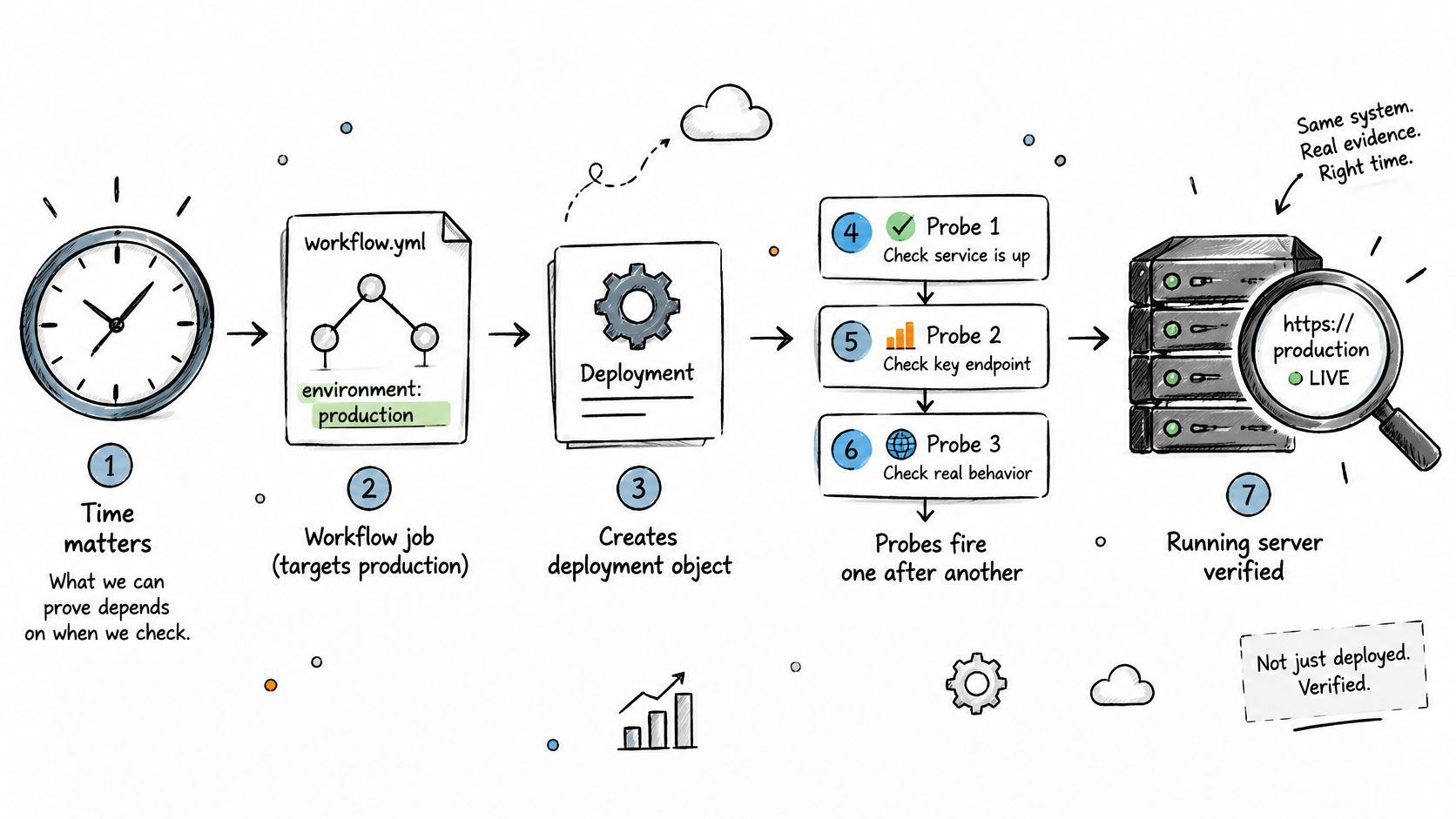
Rerun the same journey after the fix. Same account, same steps, same assertions. After your agent ships a fix, the next check confirms it on the live app, and that second run is the proof, not the commit message describing it.
Keep the evidence with the release. Screenshots, network log, timestamp, verdict. This settles the argument three weeks later about whether the checkout page was ever working on that version.
Staging blocks, production reverts
The response depends on the environment, and mixing the two responses wastes the check. On staging, a failed journey blocks promotion. Nobody argues, because the release just doesn't continue.
On production, the release is already live. A failed journey means revert or hotfix now, with the evidence in hand so the decision takes minutes.
A check that fails and gets ignored is worse than no check. Agree in advance what a red result on production triggers, or the result becomes another dashboard nobody reads.
What a Broken Deploy Looks Like From the Outside
Failures don't announce themselves as failures. Four shapes cover much of what a live check catches, and each one produces a green CI run for a different reason.
The diagram below maps the failure shapes that hit authentication first, because that is where a green build and a working app diverge most visibly.
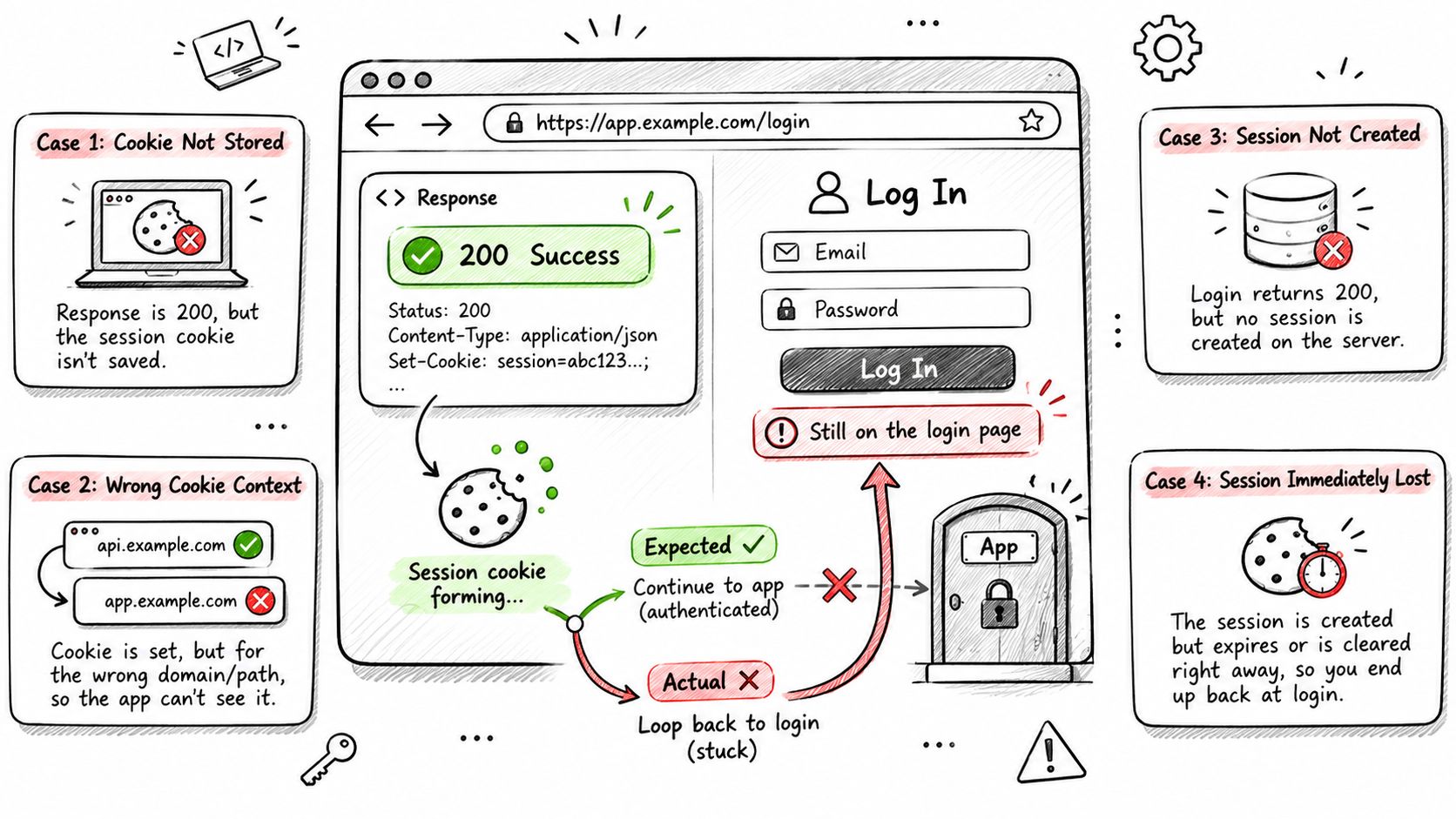
The request succeeds and the journey fails. Sign-in returns 200, the server sets a session cookie, and the page never leaves the login URL. The user is authenticated and stuck at the same time. CI stays green because the API test asserted the status code and never opened a browser. This exact case, with the check that found it, is on our Why page.
The authorization regression. An authenticated action returns an authorization error for an account that should be allowed. Role logic changed, or a cache kept the old permission set. The suite stayed green because it ran as a fixture user whose role was hardcoded to admin.
Third-party content disappears. An embedded video stops loading because the host changed its policy or removed the asset. The build had nothing to do with it, and any test that mocked the embed passed.
Nothing was deployed at all. Expired credentials, a rotated certificate, a DNS change or a degraded hosted service breaks a journey while the code stays identical. Release gates don't see this kind of silent degradation, because they only run when something ships. The 2025 DORA report announcement makes a related point: without robust control systems such as strong automated testing and fast feedback loops, an increase in change volume leads to instability.
Deployment-triggered checks catch the first three when they run against the deployed app with a real account. Scheduled checks on the critical journeys catch the fourth.
A useful verdict contains three things: pass or fail per journey, the evidence for the failing step with screenshots and network logs, and how you'll know it's fixed. That verdict should go to the agent that can act on it, not only to a human inbox.
Wiring a Check Into Your Agent and Your Deploys
Three wiring points, in order of payoff: the deploy event, the agent session, then a schedule for everything that didn't make the critical list. The deploy event comes first because a check nobody triggers doesn't run.
Trigger on the deploy, not the push
A workflow on deployment_status gated on success fires when production has received the release. A push trigger fires on every branch update and verifies nothing about the environment. This matters more than it sounds, because plenty of teams haven't automated deployment yet: according to the CD Foundation's State of CI/CD report, 27% of developers used continuous delivery or deployment to automate code deployments in Q1 2024. For everyone else, attaching the check to the deploy that a person or script performs is the only way it runs at the right moment.
With CheckMyApp, once its GitHub App is installed, checks run after each connected deploy, and your agent can ask for one at any time.
Add the MCP server in the agent you use
Claude Code, Cursor and Codex all support remote MCP servers, and OpenAI's MCP documentation shows the configuration for each:
Codex:
codex mcp add <name> --url <server-url>Claude Code:
claude mcp add --transport http <name> <url>. The Claude Code MCP reference describes--scope local,projectanduser;projectwrites.mcp.jsonin the project root so a whole team can share the server.Cursor: add an entry with a
urlundermcpServersin~/.cursor/mcp.json.
The payoff is a closed loop inside one session: the agent writes the fix, requests a check, reads the verdict, and either stops or keeps working. No copy-paste between a terminal and a browser.
Three ways to check a deployed app
| Option | Where it runs | Who drives it | Evidence it leaves | Best for |
|---|---|---|---|---|
| Playwright MCP | Your machine, in a local browser | The agent, inside its own session | What the agent reports and saves in the chat | Free local scripting, localhost work, authoring flows |
| CI end-to-end suite | A build runner, against a staging build with fixtures | Your pipeline | Logs and artifacts | Wide coverage before release |
| CheckMyApp | The deployed app, outside the agent's session | On deploy, daily, or when the agent asks | Screenshots, network logs and a per-journey verdict | Confirming the live app after the agent says it is done |
- Option
- Playwright MCP
- Where it runs
- Your machine, in a local browser
- Who drives it
- The agent, inside its own session
- Evidence it leaves
- What the agent reports and saves in the chat
- Best for
- Free local scripting, localhost work, authoring flows
- Option
- CI end-to-end suite
- Where it runs
- A build runner, against a staging build with fixtures
- Who drives it
- Your pipeline
- Evidence it leaves
- Logs and artifacts
- Best for
- Wide coverage before release
- Option
- CheckMyApp
- Where it runs
- The deployed app, outside the agent's session
- Who drives it
- On deploy, daily, or when the agent asks
- Evidence it leaves
- Screenshots, network logs and a per-journey verdict
- Best for
- Confirming the live app after the agent says it is done
Playwright MCP is the better choice for free local work against localhost and for writing flows in the first place, since it's open source and runs on your own machine. A CI end-to-end suite is the better choice for wide coverage before a release. What neither gives you is a separate run on the deployed app, outside the session of the agent that wrote the change, which is the case where an outside check adds something.
Setup takes a few steps. Add CheckMyApp to your agent with one command, sign in once in the browser, ask the agent to set up the app, then install the GitHub App to connect deploys.
The install guide walks the same steps in order.
Run One Live Journey After Your Next Deploy
Reduce the first week to one journey pair: sign-in plus the single action the app exists for. That pair catches session, redirect, auth and write-path failures at once.
Pick the pair. Sign-in, then the action that creates and saves something a user would miss. Skip checkout, skip social login, skip anything that emails a stranger.
Create a test account with the same permissions a real user has, and decide whether checks may create records. Leave records off until you've seen one run and know what it writes.
Connect the deploy so the check runs on the next release without anyone remembering to ask for it.
Read the first verdict and keep it next to the release. It should say what broke, on which journey, with screenshots and network logs, and how you'll know it's fixed.
What the check does and doesn't prove
A check reports only what it saw on that run. It isn't a guarantee that the app is free of defects, and treating a pass as one is how teams stop looking. A check against the live app also doesn't read your source, which is why it can disagree with a suite that passed minutes earlier.
That also means it reports what broke, not why. Root cause stays with the code, the logs and the agent. For logic, keep unit tests. For wide pre-release coverage, keep the end-to-end suite. For free local scripting and flow authoring, Playwright MCP is the right tool.
One live journey, one real account, one release. That's enough to know whether the agent's report matches the app.
Your agent says “done”. We check your app.
Your agent says done. CheckMyApp uses your live app as a real user and tells it what broke, with screenshots and network logs on every verdict. It connects to Claude Code, Cursor and Codex through MCP and to your deploys through a GitHub App.
claude mcp add --scope user --transport http checkmyapp https://checkmyapp.dev/mcpFree account: $3 of checks, no card · Cursor, Codex and the full install guide
Produced via Outrank tool
This article was prepared with the help of AI. Found a mistake? Tell us.